
The Bid Software Comparison Platform
Research, compare and explore hundreds of bid, proposal and work-winning software solutions.
Explore Solutions…



Find the best bid software on the market – FAST!
We simplify your journey to finding the best bid, proposal, tender and RFP management software. Unlock your full work-winning potential with the Bid Software Comparison Platform.
Use Match & Compare to find the right bid software in minutes
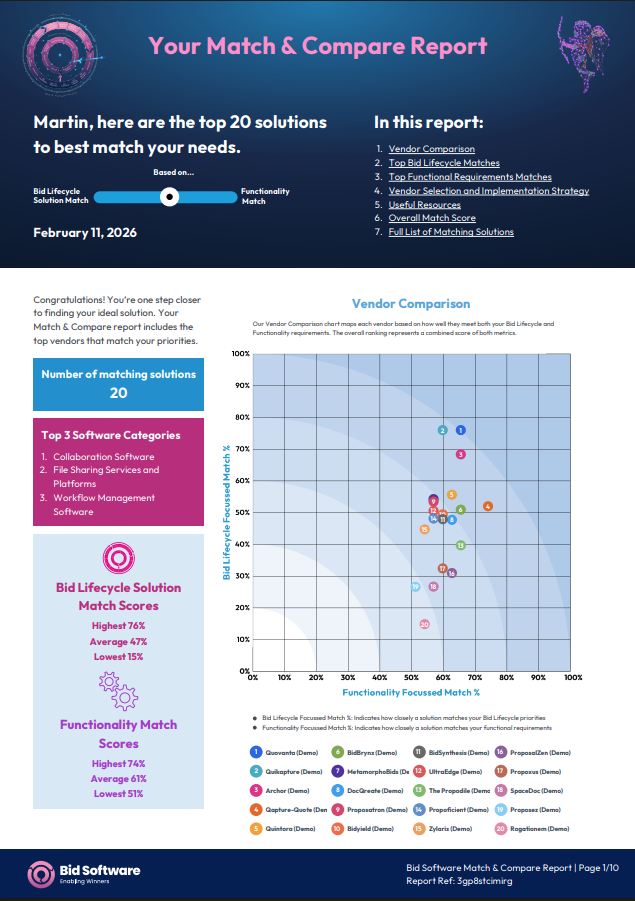
Our innovative Match & Compare reports deliver personalised bid management software recommendations, matched with your bespoke functional, technical and bid team requirements, in minutes.
Each bespoke report includes up to twenty matching solutions, as well as heatmaps of your top three Bid Lifecycle matches and a list of the functional features those vendors provide, allowing you to immediately compare your highest ranked solutions.
We are proud that Match & Compare is 100% vendor agnostic. No vendor bias or promoted ranking will ever influence your matches.
Use Match & Compare to find the right bid software in minutes
Perform in-depth bid software searches and comparisons
Perform in-depth bid software searches and comparisons
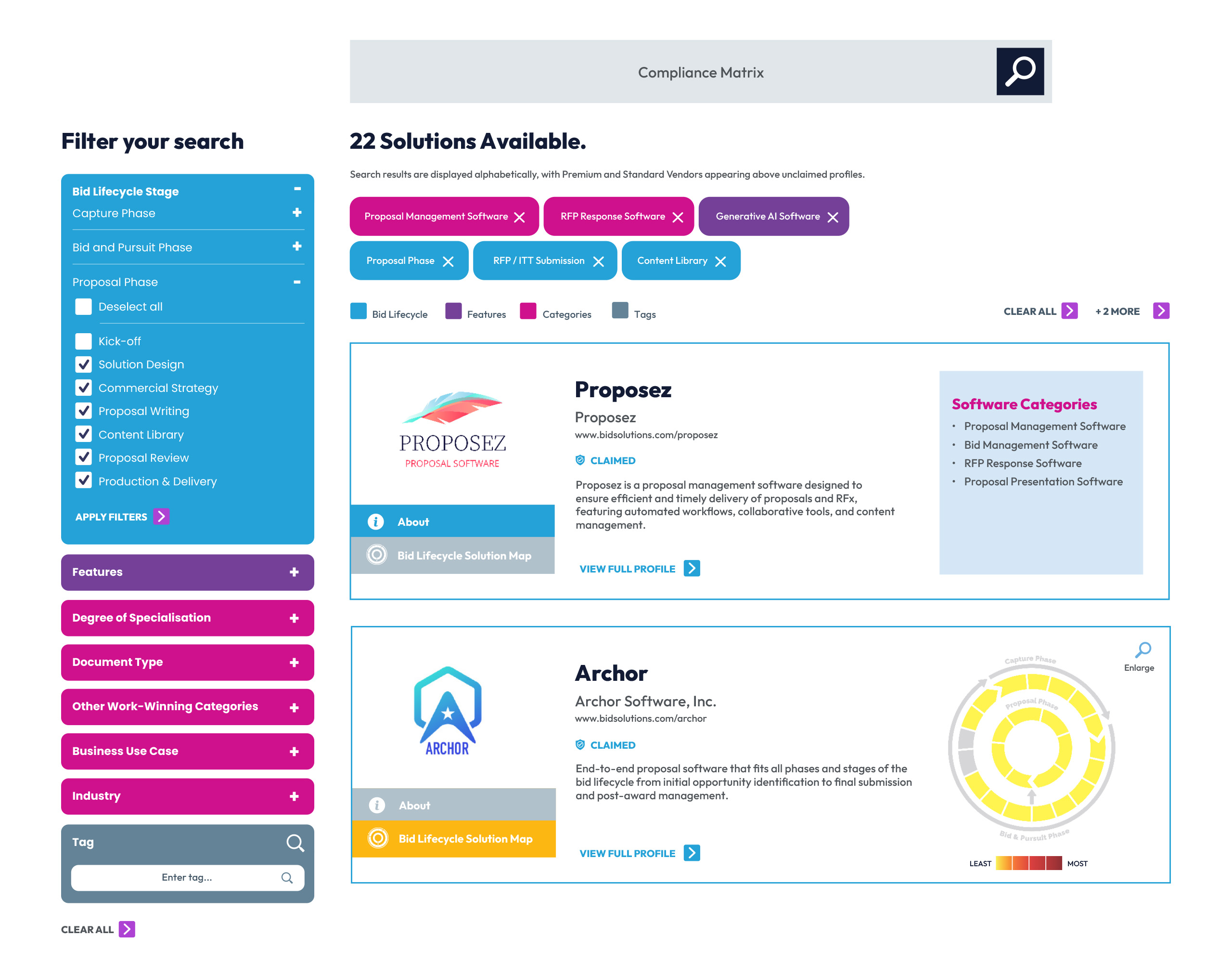
Discover and compare solutions for each phase of the Bid Lifecycle.
Compare solutions by AI Capability, Software Specialisation, Document Type, Industry, Tags and so much more.
Save weeks of research time – we’ve done the hard work for you. Over 50 specialist categories, 45 core features, 24 Bid Lifecycle phases, 6 core bid personas, industries, languages and tags.
Prioritise Bid Lifecycle phases that align with your software requirements
Our Bid Lifecycle focussed solution allows you to select and prioritise the phases most relevant to your bid software needs.
By prioritising specific Bid Lifecycle stages, you create a focussed match strategy aligned to Vendor capabilities, increasing confidence in your procurement process and chosen work-winning software.
Prioritise Bid Lifecycle phases that align with your software requirements

Comprehensive vendor profiles allow you to research and compare the market and shortlist preferred bid software solutions

Comprehensive vendor profiles allow you to research and compare the market and shortlist preferred bid software solutions
Vendors position their bid management software solutions using heatmaps and language bid professionals understand, helping you to better compare competing solutions and build a strong business case.
Review case studies, understand key integrations, compare commercial models, request demos and rapidly compile detailed market analysis to gain decision-maker approval. request demos and rapidly compile detailed market analysis to gain decision-maker approval.
Side-by-Side Vendor
Comparison
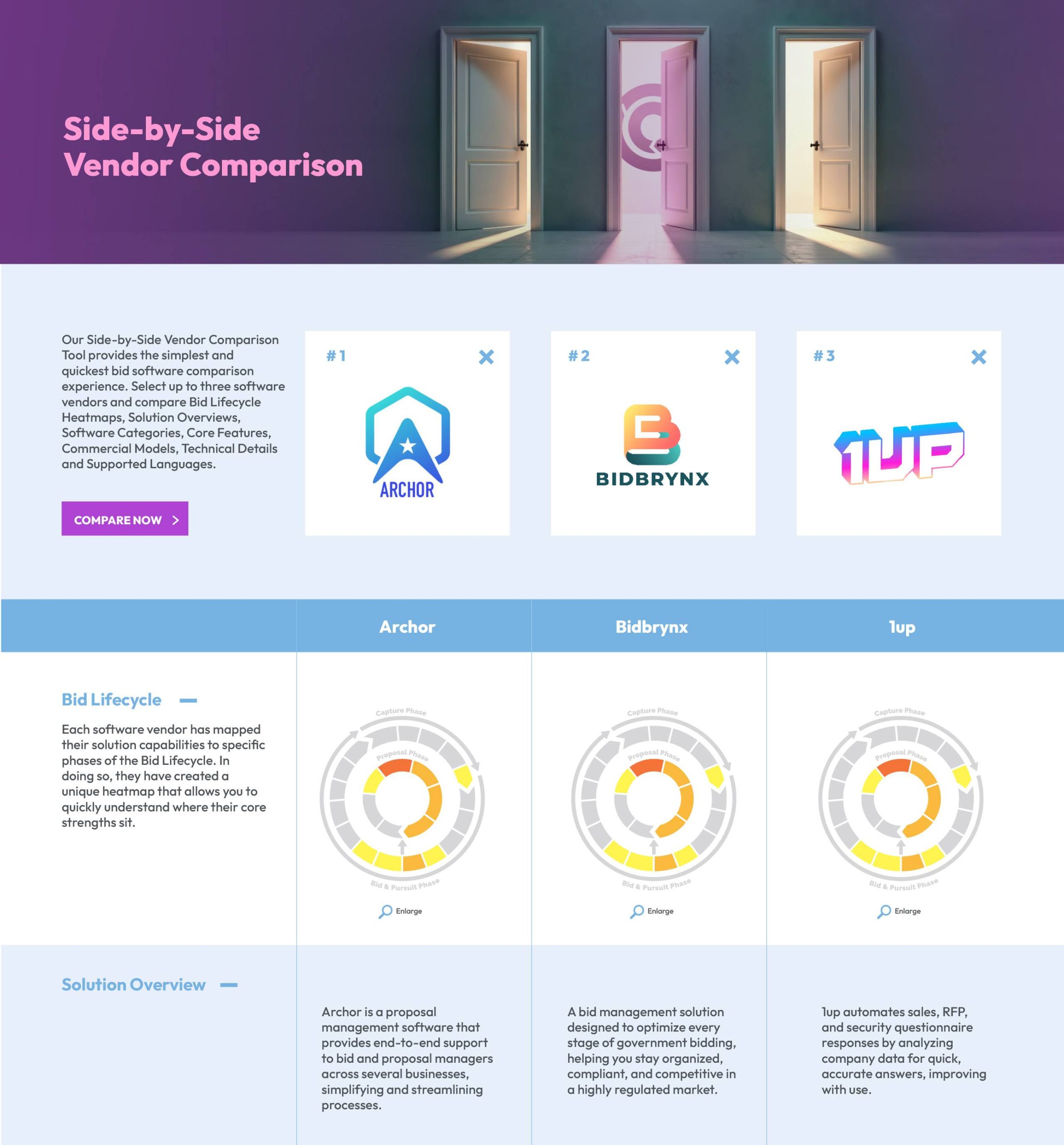
Our Side-by-Side Vendor Comparison Tool provides the simplest and quickest bid software comparison experience. Select up to three software vendors and compare Bid Lifecycle Heatmaps, Solution Overviews, Software Categories, Core Features, Commercial Models, Technical Details and Supported Languages.
Side-by-Side Vendor
Comparison
Browse the complete bid software directory
Browse the complete Bid Software directory
Choosing the right bid management software is a time-consuming and complex process.
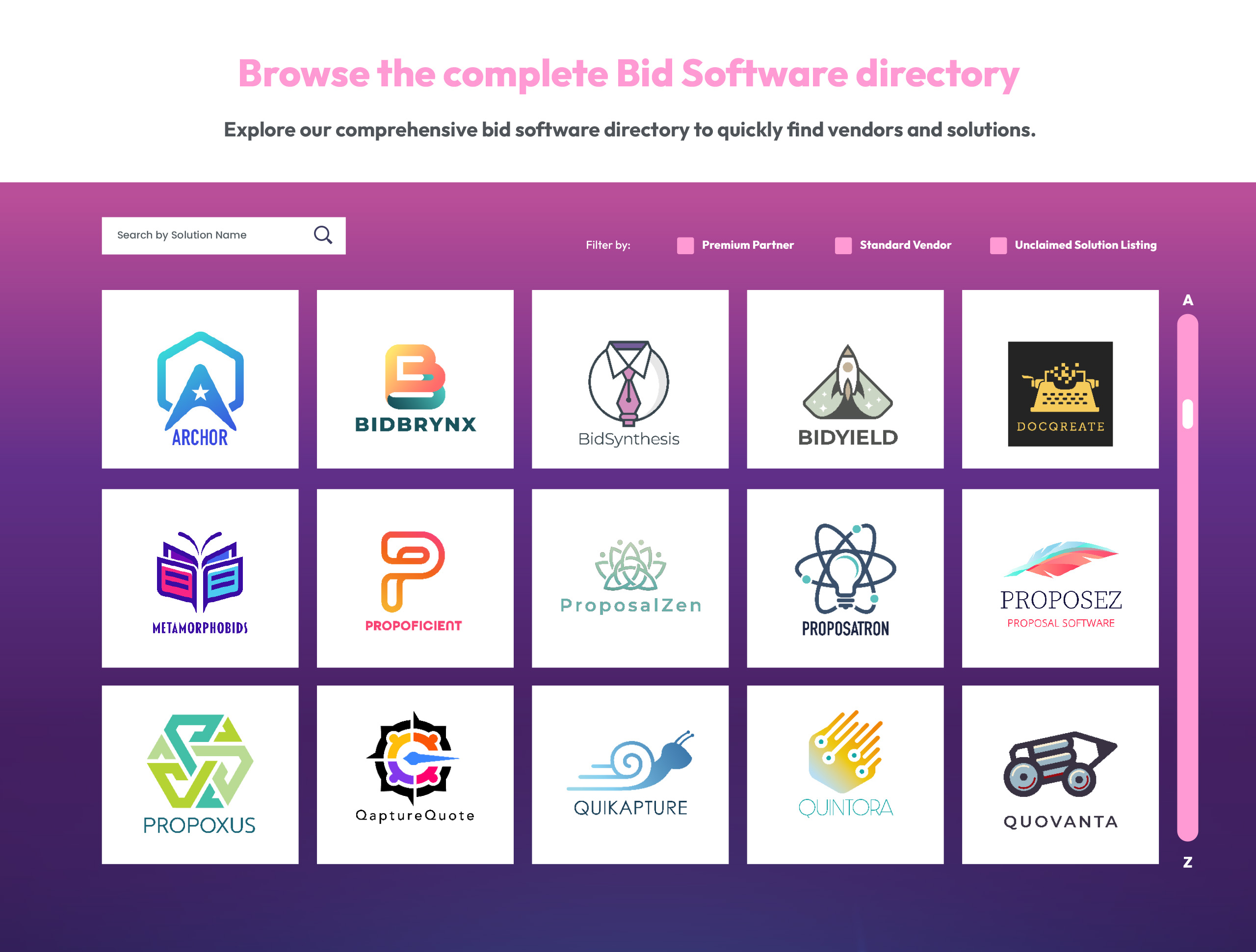
Explore our comprehensive bid software directory to quickly find and compare bid management software, proposal management software and working-winning solutions tailored to your specific needs.
Review the Latest Bid Software News
In the rapidly evolving bid software market, it pays to stay one step ahead of the news. Keep up to date with all the latest research, trends and developments from our Premium Vendors.
Review the Latest Bid Software News
-
 05/03/26 by Martin Smith
Bid Solutions and CSK Management Announce Strategic Pan-European Partnership to Elevate Bid Capability and Professional Standards
More: Bid Solutions and CSK Management Announce Strategic Pan-European Partnership to Elevate Bid Capability and Professional StandardsBid Solutions and CSK Management Announce Strategic Pan-European Partnership to Elevate Bid Capability and Professional Standards
-
 02/03/26 by QorusDocs
QorusDocs’ 10th Annual Proposal Management Benchmark Report
More: QorusDocs’ 10th Annual Proposal Management Benchmark ReportProposal teams now sit at the center of revenue. Explore insights from the 10th Industry Benchmark and why capacity, AI, and value matter.
-
 24/02/26 by Martin Smith
Bidding Quarterly 24 – OUT NOW!
More: Bidding Quarterly 24 – OUT NOW!Beyond the Prompt: Real Wins in the Real World has 17 fabulous expert contributions brimming with fantastic advice for winning in the AI era.
-
 07/02/26 by Martin Smith
Identifying and evaluating AI use cases
More: Identifying and evaluating AI use casesVia our ‘Ask The Expert’ forum, Kirsty Isles was recently asked if she could suggest a way to capture details of how different teams across an organisation are experimenting with AI and evaluate the potential effectiveness of these use cases. You can read her insightful response by clicking here, and download a free example tracker…
-
 05/02/26 by BidScript
Go/ No-Go Environment – Your New Competitive Advantage
More: Go/ No-Go Environment – Your New Competitive AdvantageThis isn’t just smarter qualification – it’s a new way to prioritise better bids, accelerate decisions, and improve win rates. Everything you need to assess, align, and act, in one powerful experience
-
 28/01/26 by Martin Smith
The Bid Software Comparison Platform welcomes QorusDocs
More: The Bid Software Comparison Platform welcomes QorusDocsI’m delighted to welcome QorusDocs to the Bid Software Comparison Platform. QorusDocs is a unified platform that connects value storytelling with proposal execution. Build credible ROI business cases, generate tailored proposals in minutes, and streamline collaboration across BD, sales, and proposal teams. The result: stronger narratives, faster decisions, and more wins. QorusDocs brings value modelling…
-
 28/01/26 by Martin Smith
Lucius AI joins the Bid Software Comparison Platform
More: Lucius AI joins the Bid Software Comparison PlatformI’m excited to welcome Lucius AI to the Bid Software Comparison Platform. Lucius AI is a risk engine for government tenders. It can instantly shred 100+ page PDFs into compliance matrices, flag “Killer” disqualifiers (like CIDB grading), and draft compliant responses. Its Bid/No-Bid risk scoring and automated drafting reduce prep time by 90% and ensure…
-
 10/12/25 by Martin Smith
Brainial joins the Bid Software Comparison Platform.
More: Brainial joins the Bid Software Comparison Platform.I’m delighted to welcome Brainial to the Bid Software Comparison Platform. Brainial is the AI tender platform that streamlines how teams discover, qualify, and respond to bids. It centralises your workflow, automates risk analysis, and generates traceable proposals so you cut manual work, ensure compliance, and focus on winning. From intelligent Qualification and Risk Analysis…
-
 09/12/25 by Brainial
The Top 3 Challenges Faced by Tender Teams
More: The Top 3 Challenges Faced by Tender TeamsStruggling to find tenders, analyze risks, or search docs? We explore the top 3 challenges tender teams face and how Brainial’s AI solves them to save time and make smarter bid decisions.
-
 09/12/25 by Brainial
The merging of humans and machines is happening now
More: The merging of humans and machines is happening nowDiscover how Brainial merges human expertise with machine speed. In this article, we explain how three specific AI technologies turn chaotic tender documents into structured, winning insights.
FAQs
What is the Bid Software comparison platform?
The Bid Solutions software comparison platform is the profession’s only global, bid-focused software comparison platform and your gateway to hundreds of bid, proposal, and work-winning software and technology solutions. The platform provides a comprehensive directory of bid management software vendors with over 100,000 data points to explore and compare.
The platform allows you to research, compare, browse, and shortlist bid management software, proposal management software, and work-winning solutions tailored to your specific needs. With access to more than 250 bid and proposal-focused software and technology solutions, the platform saves you weeks of research time by providing all vendor information in one centralised location.
Whether you need software for specific phases of the Bid Lifecycle, AI-enabled solutions, or industry-specific tools, the platform helps you quickly find and compare options to make informed procurement decisions.
What search and comparison capabilities does the bid software platform offer?
The Bid Solutions platform provides extensive in-depth search and comparison capabilities designed to help you find the perfect software solution efficiently:
Search Categories:
- Over 50 specialist software categories
- AI Capability filtering
- Software Specialisation
- Document Type compatibility
- Industry-specific solutions
- Language support
- Custom tags and classifications
- 45 core features
- 24 Bid Lifecycle phases
- 6 core bid personas
Comparison Tools:
- Match & Compare – Our pioneering Match & Compare reports simplify your journey to finding the best bid management software. We provide comprehensive vendor information matched with your bespoke functional, technical and bid team requirements, in minutes.
- Side-by-Side Vendor Comparison Tool – The simplest and quickest bid software comparison experience. Select up to three software vendors and compare Bid Lifecycle Heatmaps, Solution Overviews, Software Categories, Core Features, Commercial Models, Technical Details, and Supported Languages all in one view.
- Comprehensive Vendor Profiles – Detailed profiles allow you to research and compare the market thoroughly, review case studies, understand key integrations, compare commercial models, and request demos.
- Browse Directory – Explore the complete bid software directory to quickly find solutions at your own pace.
The platform saves you weeks of research time by organising over 100,000 data points in an accessible, searchable format.
Guide to Match and Compare
Our pioneering Match & Compare reports match your bespoke functional, technical and bid team requirements with the capabilities and solution focus offered by vendors listed on the Bid Software platform in seconds, and includes comprehensive information and analytics about your matches.
Reports include heatmaps of your top three Bid Lifecycle matches and a list of the functional features those vendors provide, allowing you to compare your highest ranked solutions at a glance.
All user-generated reports are 100% vendor agnostic. No promoted vendor ranking is or will ever be available in Match & Compare.
In this article we’ll cover the following:
- Where to find Match & Compare
- How to request your Match & Compare Report
- Filling in the initial request form
- Completing the business priorities and goals survey
- Generating your Bid Lifecycle Heatmap
- Specifying your functional requirements
- Confirm and request your report
- How you will receive your Match & Compare Report
1. Where to find Match & Compare
You can find Match & Compare under the ‘Bid Software’ top navigation menu. Click on ‘Bid Software’ and then on ‘Match & Compare‘ to get started.

2. How to request your Match & Compare Report
Filling in the initial request form
Before you can request and receive your Match & Compare report, you will be asked to provide some basic contact information and accept the Terms and Conditions.
We will use this information to email you a copy of your Match & Compare report when it is ready.
If you wish to shortcut the process to connecting with the right solution vendor even further, you may also tick the box ‘I’m happy to be contacted by my top five matched Premium Vendors’. This saves you from having to reach out to those vendors for further information and lets them come to you instead. This is entirely optional of course.
To learn more about our privacy policy and how we handle your data, click here.

Completing the business priorities and goals survey
Next, you’ll be guided to the Goals section of the survey, which is comprised 7 short questions. Completing this section thoughtfully allows us to align your business objectives with the Bid Lifecycle in the next step.

When you’re ready to proceed, click Next at the bottom of the page.

Generating your Bid Lifecycle Heatmap
Review and confirm your Bid Lifecycle phase selections
We’ll use the information you provided in the business objectives survey to generate a visual map showing how these align to each phase of the Bid Lifecycle.

You can validate the selections that have been made for you and modify them as required by interacting directly with the Bid Lifecycle image. Click on any phase to select or deselect it. To create a focussed comparison strategy and match you to the best software, please select a maximum of ten phases.

You may deselect a Bid Lifecycle phase by clicking the ‘x’ next to its label.

Once you’re happy with your Bid Lifecycle selections, press Next to continue to the Bid Lifecycle Heat Map:

Rank your bid-related priorities in order of importance
Here, you’ll be able to rank your business priorities by dragging your selection up or down on the left of the page—helping us generate even more accurate vendor matches based on what matters most to you.
Higher priority Bid Lifecycle segments will appear in a warmer colour compared to lower priority segments in the Bid Lifecycle heatmap on the right of the page.

When you’re ready, click ‘Next’ to proceed to the next step.
TIP: You can also track your progress using the timeline in the top-right corner of the screen at each step. Clicking on a previous section will take you back to that point in the survey.
Specifying your functional requirements
Quickly refine your must have features and functionality using our Popular Solutions, Bid Persona, or Self-select tools.You can use any one of the tools, or a combination of all three.
Popular Solutions: Simply select the solution that most closely matches your requirement and we automatically add the industry standard core functionalit

Bid Persona: Add functionality that aligns with each core roles typical deliverables and is focussed on streamlining its specific responsibilities. To learn more about the 6 core bid roles and how they interact, please click here. To review job descriptions, click here

Self-select: If you are comfortable selecting you own features and functionality, or if your wish to add to your Popular Solutions or Bid Persona selections, use the self-select options below.
When you’re satisfied that you have selected the functional requirements that matter to you, click on ‘Next’ at the bottom of the page.

Confirm and request your report
You’ll now see a final preview of your choices before generating your Match & Compare report.

Scroll to the bottom of the page and click ‘Confirm and Request Report’ to complete the process.

3. How you will receive your Match & Compare Report
Your Match & Compare Report will be generated within seconds and will appear on your screen next and you will receive an email with a unique link to view your report. This link is valid for 30 days.
At any time, you may download a PDF version of the report by clicking on Download on the top right of the report page.

How does the Match & Compare report work?
Match & Compare is a pioneering tool that simplifies your journey to finding the best bid management software by providing comprehensive vendor information matched with your bespoke functional, technical, and bid team requirements in minutes.
How it works: When you create a Match & Compare report, you input your specific requirements including the Bid Lifecycle phases you want to prioritise, functional features you need, technical specifications, and team preferences. The platform’s unique algorithm then cuts through the jargon to identify solutions that best match your needs.
What you receive: Each bespoke report includes up to twenty matching solutions, heatmaps of your top three Bid Lifecycle matches, and a comprehensive list of the functional features those vendors provide. This allows you to immediately compare your highest-ranked solutions at a glance and build a strong business case for decision-maker approval.
100% Vendor Agnostic: Bid Solutions is proud that Match & Compare is completely vendor agnostic. No vendor bias or promoted ranking will ever influence your matches, ensuring you receive truly objective recommendations based solely on your requirements.
What information is available in bid software vendor profiles?
Comprehensive bid software vendor profiles provide everything you need to thoroughly research and compare bid software solutions:
Profile Components:
- Bid Lifecycle Heatmaps – Visual representation of which Bid Lifecycle phases each vendor’s software supports, allowing you to quickly assess alignment with your needs
- Solution Overviews – Detailed descriptions of the software’s capabilities, approach, and value proposition
- Software Categories and Specialisations – Clear classification of the vendor’s focus areas and expertise
- Core Features – Detailed listing of functional capabilities across 45+ core features
- Case Studies – Real-world success stories demonstrating the software’s impact on win rates, collaboration, efficiency, and other key metrics
- Key Integrations – Information about compatibility with other systems and tools you may already use
- Commercial Models – Understanding of pricing structures and licensing approaches
- Technical Details – Specifications including supported languages, deployment options, and technical requirements
- Demo Requests – Direct ability to request demonstrations from vendors
This comprehensive information enables you to rapidly compile detailed market analysis and gain decision-maker approval by building a well-informed business case.
Can I get expert help selecting the right bid software?
Yes, Bid Solutions offers expert-led vendor selection services to navigate your software procurement journey. These services provide professional support to help you identify, evaluate, and implement the right software for your business.
Vendor Selection Services: The platform offers four flexible services designed to enhance your work-winning capabilities and deliver better bidding outcomes. These services align with every phase of the Bid Lifecycle and provide hands-on support throughout your software selection journey.
Benefits of expert support:
- Professional guidance from specialists who understand both bid processes and software capabilities
- Assistance in defining your requirements and prioritising Bid Lifecycle phases
- Help interpreting vendor information and comparing solutions objectively
- Support building business cases for stakeholder approval
- Implementation guidance to ensure successful software adoption
This expert support is particularly valuable for organisations making significant software investments, those new to bid management software, or teams who want to ensure they’re making the optimal choice without dedicating extensive internal resources to the evaluation process.
Is Match & Compare really vendor neutral?
Yes, absolutely. Bid Solutions maintains strict vendor neutrality across the Match & Compare system. The Match & Compare algorithm and all ranking systems are 100% vendor agnostic, meaning no vendor bias or promoted ranking will ever influence your matches.
What this means for you:
- All matches are based purely on how well each vendor’s capabilities align with your specific requirements
- No vendors pay for preferential placement or higher rankings in your Match & Compare reports
- Comparison results are determined by relevance to your criteria, not by vendor relationships or advertising spend.
Our commitment: Bid Solutions is committed to providing objective, unbiased information to help you make the best software procurement decision for your organisation. The Match & Compare platform exists to serve bid professionals seeking software solutions, not to promote specific vendors. This independence is fundamental to the value and integrity of the comparison platform.
What is the Bid Lifecycle and how does it relate to software selection?
The Bid Lifecycle is a comprehensive framework that guides you through each stage of the bid process, from contact to contract. It encompasses 24 distinct phases that represent the complete journey of pursuing and winning business opportunities.
How the software platform uses the Bid Lifecycle: The Bid Solutions software comparison platform is uniquely focused on the Bid Lifecycle, allowing you to select and prioritise the phases most relevant to your bid software needs. By prioritising specific Bid Lifecycle stages, you create a focused match strategy aligned to vendor capabilities, increasing confidence in your procurement process and chosen work-winning software.
Benefits of this approach: This lifecycle-focused solution ensures you’re not just comparing software features in isolation, but evaluating how well each vendor supports the specific stages of bidding that matter most to your organisation. Vendors position their bid management software solutions using Bid Lifecycle heatmaps and language that bid professionals understand, making it easier to compare competing solutions and identify which tools will deliver the greatest impact at each stage of your bid process.
How does the platform handle AI-enabled bid software?
The platform includes comprehensive filtering and comparison capabilities specifically for AI-enabled bid software solutions, recognising that artificial intelligence is increasingly important in modern bid management.
AI Capability Search: You can compare solutions by AI Capability as one of the primary search criteria, allowing you to specifically identify vendors who offer AI-powered features and understand how they apply artificial intelligence to improve bidding outcomes.
Latest Developments: The platform keeps you informed about the rapidly evolving bid software market through regular news and updates from vendors, including developments in AI and automation. This ensures you stay one step ahead of trends and can evaluate how different vendors are incorporating cutting-edge technology into their solutions.
Evaluation Support: When comparing AI-enabled solutions, vendor profiles provide details about how artificial intelligence is implemented, which Bid Lifecycle phases benefit from AI features, and case studies demonstrating real-world impact. This helps you move beyond marketing claims to understand the practical value of AI capabilities for your specific bidding needs.
How can I stay updated on bid software news and trends?
Bid Solutions is committed to providing the latest bid software news, trends, products, and innovations to help you win more often. The platform offers several ways to stay informed:
Bid Software News Section: In the rapidly evolving bid software market, the platform features a dedicated news area showcasing the latest research, trends, and developments from vendors. This includes:
- Real-world success stories demonstrating software impact on win rates, collaboration, and efficiency
- Product updates and new feature announcements
- Industry trends in proposal management and document automation
- Case studies from various sectors showing how organisations are using software to transform their bidding
- Future trends in bid lifecycle management and technology innovation
Premium Vendor Content: Keep up to date with developments from Premium Vendors who regularly share insights, best practices, and product evolution.
Resource Centre: The News & Resources section provides ongoing content to help you understand market developments and make informed decisions about software adoption and upgrades.
What is the difference between a free Standard Profile and a paid Premium Profile?
Our free-for-life Standard Profile includes:
- Feature in unlimited Match and Compare Reports and access high-level analytics
- Create a fully customised profile and receive inbound leads from embedded Contact Forms
- Feature in 5 different software categories
- Profile searchable in advanced filters – Bid Lifecycle, Features, Bid Personas, Industries and Languages
- Access to Match & Compare Stats via the Dashboard
- Profile features in Vendor Side-by-Side Comparison and Vendor Directory
- Post 1 News item per month and feature in the monthly News Digest
- Promoted in Search Listings above Basic / Unclaimed Vendors
- Access to platform sponsorship options
From just £299 per month, Premium includes everything in Standard, plus:
- Unlimited focussed leads, qualified opportunities and target clients from a global audience of over 50,000 bid professionals
- Feature in 15 different Software Categories
- Promoted to top of all Search results
- Dashboards featuring real-time market insights and analytics
- Branded ‘Welcome to the Platform’ promotion post on social
- Unlimited News and Posts on Bid Solutions website and feature in monthly News Digest
- Feature in monthly Bid Software News Digest shared across socials
- Access to ‘Verified’ Vendor programme
- Unlocks Software Categories and promoted Search Listings
- Priority access to platform sponsorship and advertising opportunities
Please visit our Vendor Page and Pricing Plans page for a detailed comparison of the features included in each subscription tier.
Contact Us
We’re ready to help you access the profession’s only global, bid-focussed software comparison platform. Get started today.


